WordPress plugin

Weberslink Redirects & 404 Monitor — never lose a visitor to a dead link.

Fix broken links in one click, keep SEO value when pages move, and see exactly where every address goes.

Download ZIP Version 1.0.0 · 23 KB · WordPress 5.9+ · PHP 7.4+ · GPL-2.0-or-later

What's inside

  • Every kind of redirect: 301, 302, 303, 307, 308 plus 410 Gone and 451 for removed content. Match an exact URL, a whole folder (/blog/x → /news/{rest}) or a regular expression with $1, $2 in the target. Choose what happens to the query string.
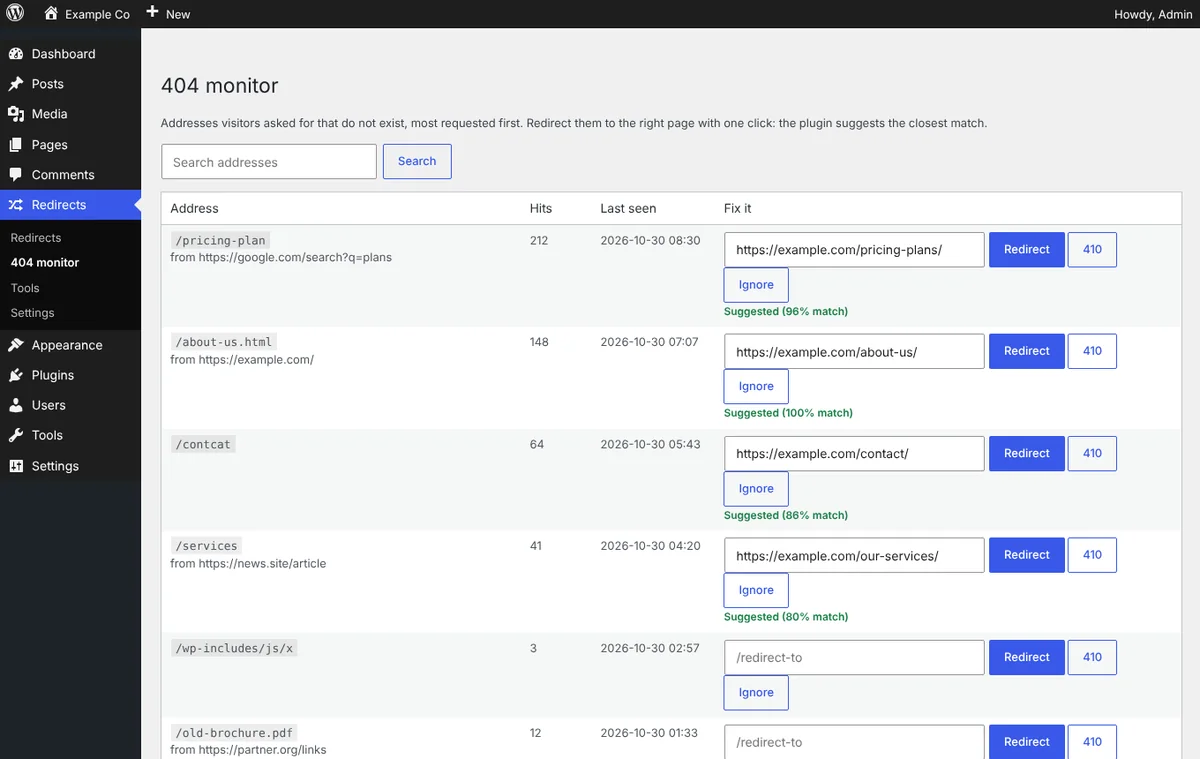
  • 404 monitor with smart suggestions: See the addresses visitors asked for that do not exist, most requested first, with the page that linked to them. The plugin finds the closest published page (typos, renamed slugs) so one click fixes it. Bots and image requests are ignored.
  • Automatic redirects: When a published post or page gets a new URL, a 301 from the old address is created for you, so shared links and search rankings keep working.
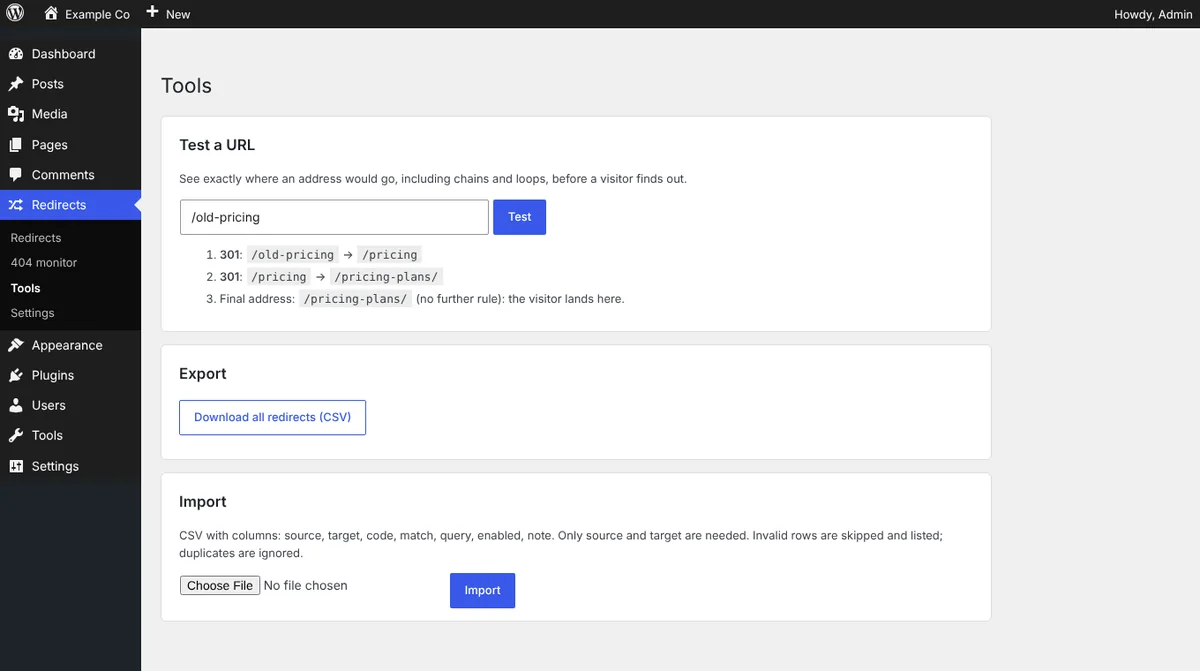
  • Safe by design: Loops, unsafe targets such as javascript: links and broken regular expressions are rejected when you save. The URL tester shows the whole chain and warns about loops and chains that are too long.
  • Fast: Active rules are compiled into one cached lookup that runs before WordPress loads the page. Thousands of redirects cost almost nothing.
  • Import, export, tidy up: CSV import with line-by-line error reporting, CSV export (spreadsheet formulas neutralised), hit counts, enable/disable and bulk actions, automatic clean-up of old 404 entries.

See how it works, screen by screen

Pick a step, or let it play. Click a screen to open it full size.
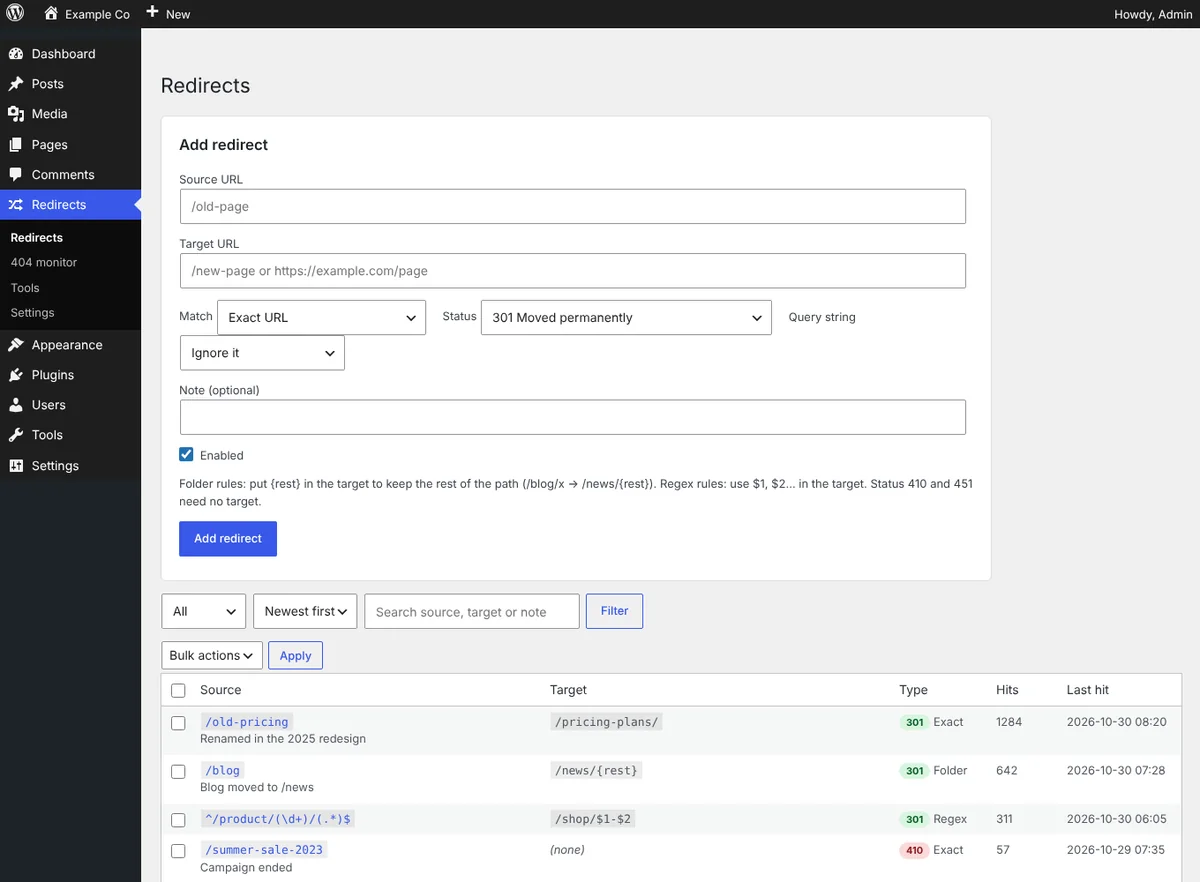
yoursite.com/wp-admin · Redirects
Manage every redirect
Step 1 · FixManage every redirectExact, folder and regex rules with status, hit counts, notes and bulk enable, disable or delete. Add one in seconds from the form at the top.
yoursite.com/wp-admin · 404 monitor
Fix 404s in one click
Step 2 · CatchFix 404s in one clickThe most requested missing addresses with where visitors came from. The closest published page is suggested, so Redirect is one click. Or answer 410 Gone, or ignore.
yoursite.com/wp-admin · Tools
Test before visitors do
Step 3 · VerifyTest before visitors doTrace any address through your rules: see each hop, and get warned about loops and long chains. Import and export CSV from the same page.

Install in 3 steps

  1. Download the ZIP above.
  2. In WordPress go to Plugins → Add New → Upload Plugin, choose the ZIP, install and activate.
  3. Open Redirects in the admin menu and add your first redirect, or check 404 monitor after a few days.

Download ZIP

Changelog

Version 1.0.0

  • Initial release: exact, folder and regex redirects, 404 monitor with suggestions, automatic redirect on slug change, URL tester, CSV import and export.

Need this set up properly, or want something built for your site? Book a free call and we'll help.

FAQ

Common questions.

Is Weberslink Redirects & 404 Monitor free?

Yes. It is a free download under the GPL and works on as many of your own WordPress sites as you like.

Will it slow my site down?

No. Rules are compiled into one cached structure and exact redirects are a single array lookup, run before WordPress loads the page.

How does the 404 monitor choose a suggestion?

It compares the last part of the missing address with the slugs of your published pages and posts and offers the closest one when it is a confident match (for example /pricing-plan → /pricing-plans/). You always confirm before anything is created.

Does it create redirects when I change a page URL?

Yes, for published posts, pages and other public content. A 301 from the old address to the new one is added automatically, and you can switch this off in Settings.

Can I move my redirects from another plugin?

Export them from the old plugin as CSV with columns source and target (optionally code, match, query, enabled, note) and import the file under Redirects → Tools. Invalid rows are skipped and listed.

Which WordPress and PHP versions does it need?

WordPress 5.9 or newer and PHP 7.4 or newer.

Next step

Ready to see what we'd build for you?

Book a free 20-minute walkthrough. We'll look at where your business loses time or leads, and what we'd build — no obligation.