WordPress plugin

Weberslink Security Shield — lock the front door properly.

Stop password guessing, add two-factor login, harden WordPress in one click and see a plain-English security score.

Download ZIP Version 1.0.0 · 26 KB · WordPress 5.9+ · PHP 7.4+ · GPL-2.0-or-later

What's inside

  • Login protection: Lock an address out after repeated failures, with longer locks for repeat offenders (up to 24 hours). A locked address is refused even with the correct password. Always-allow and always-block lists accept ranges (203.0.113.0/24, IPv6 too). Email alert on lockouts.
  • Two-factor authentication: Works with Google Authenticator, Authy, 1Password, Microsoft Authenticator and any TOTP app. Eight one-time recovery codes, codes that work only once, secrets stored encrypted. Each user switches it on from their own profile, so nobody is forced and nobody is locked out.
  • One-click hardening: Strong password policy, disable XML-RPC, hide the WordPress version, block username scans (?author=1, the REST users list, the users sitemap), disable the code editors, send security headers and optional HSTS.
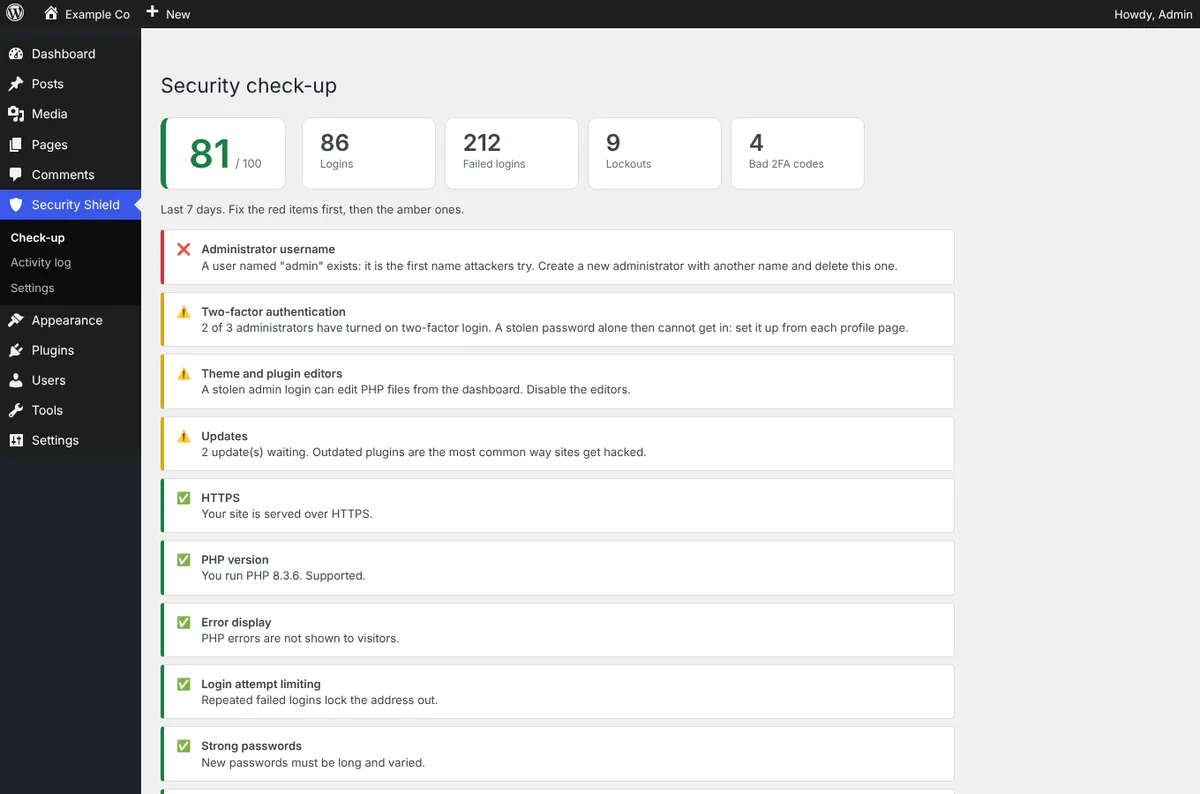
  • Security check-up: A 0–100 score with plain-English advice, worst problems first: HTTPS, PHP version, an “admin” username, two-factor coverage, pending updates and more.
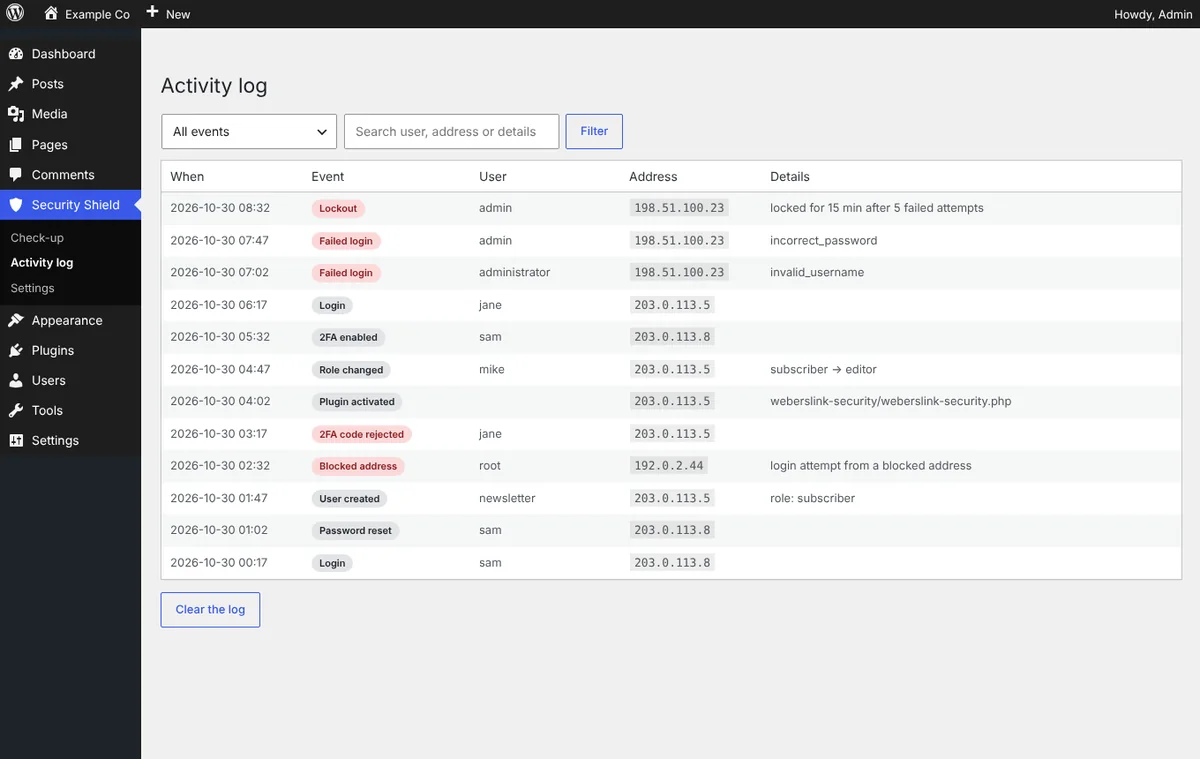
  • Activity log: Logins, failures, lockouts, 2FA changes, password resets, new and deleted users, role changes and plugin or theme changes, with the address and details. Old entries clean themselves up.
  • Careful with your users: Application passwords and the mobile app keep working, login errors never reveal whether a username exists, and a proxy header is only trusted when you choose it.

See how it works, screen by screen

Pick a step, or let it play. Click a screen to open it full size.
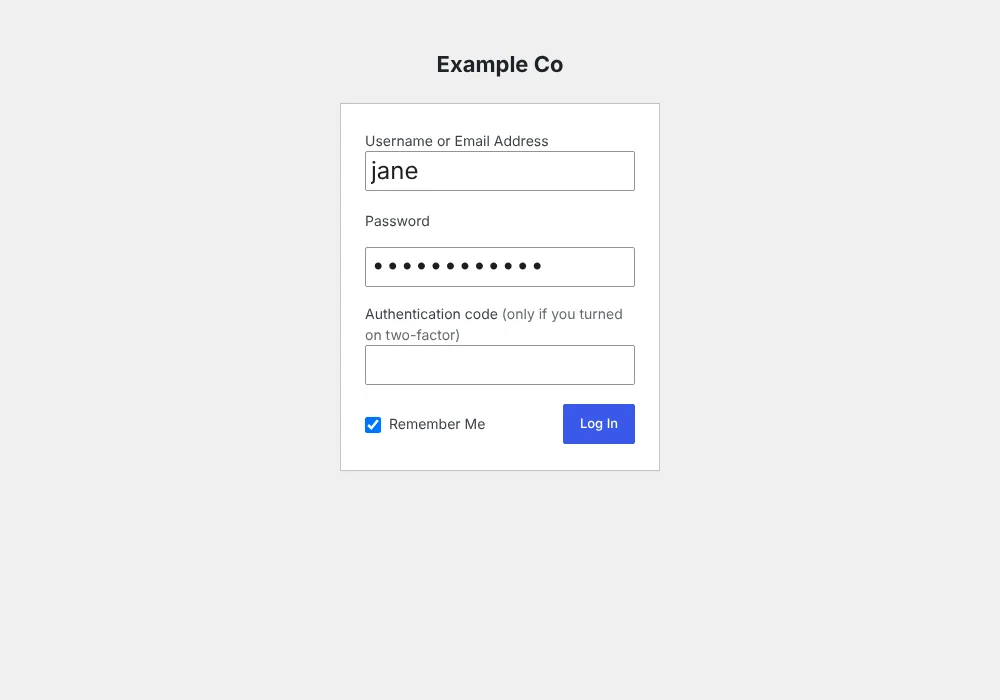
yoursite.com/wp-login.php
A second step at login
Step 1 · ProtectA second step at loginUsers who turned on two-factor enter the 6-digit code from their phone, or a recovery code. Everyone else logs in as usual.
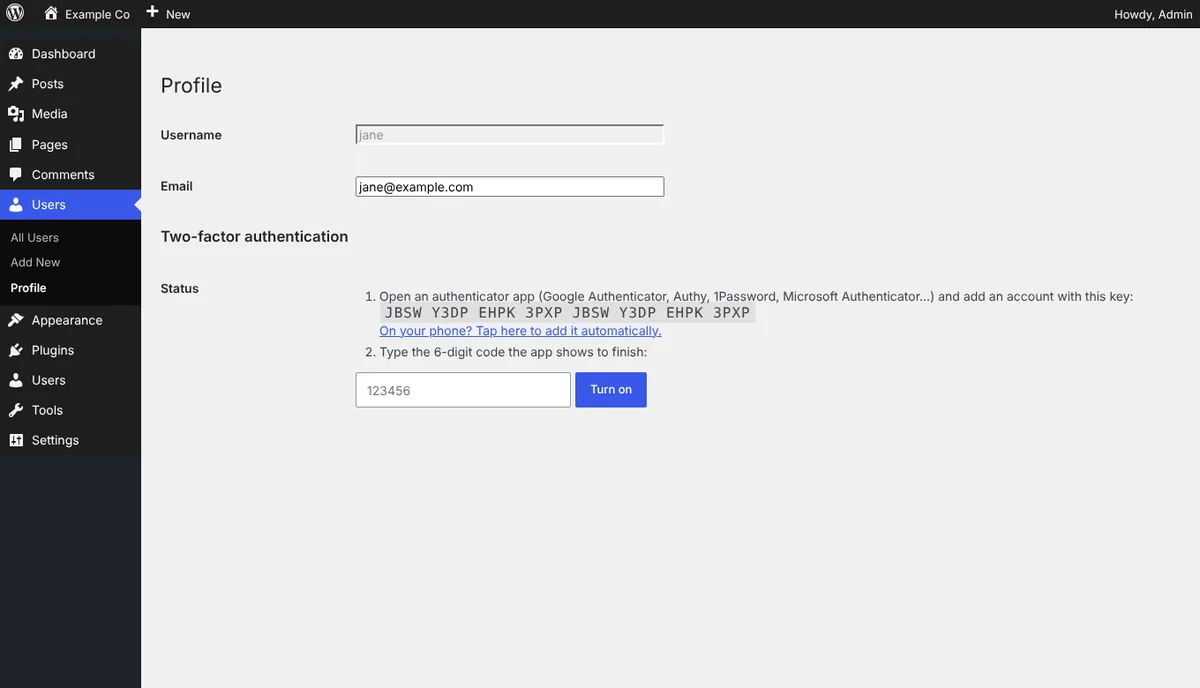
yoursite.com/wp-admin · Profile
Set up in a minute
Step 2 · ProtectSet up in a minuteAdd the key to any authenticator app (or tap the link on your phone), enter a code to confirm, and you are protected.
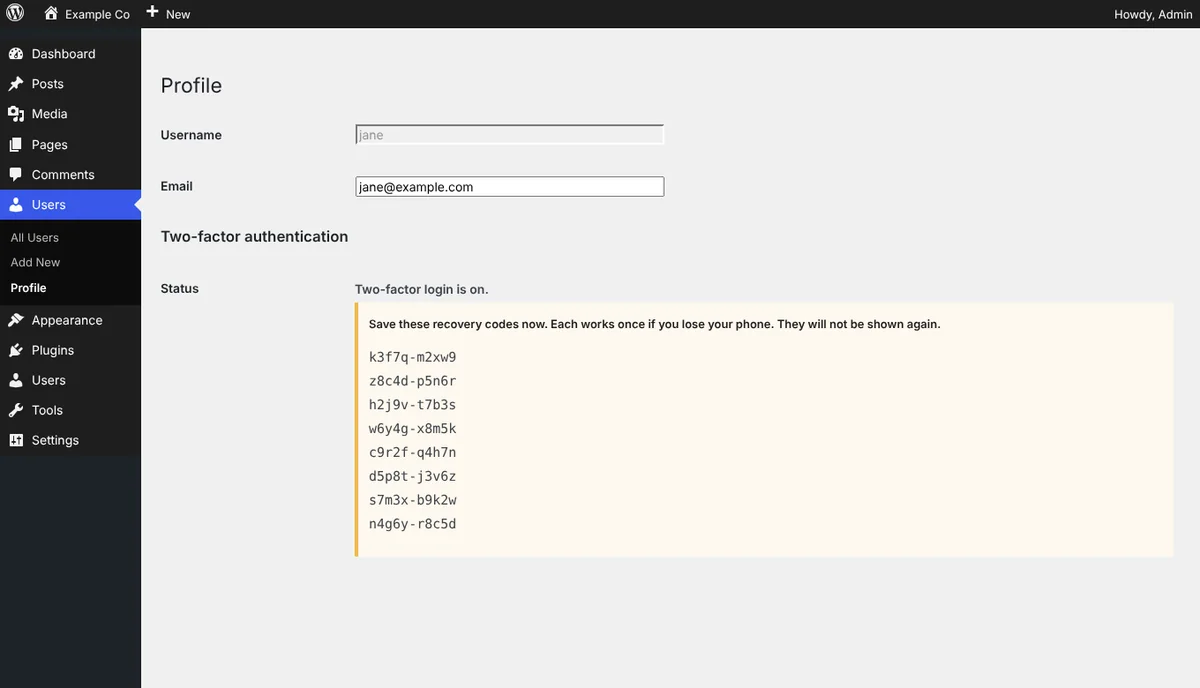
yoursite.com/wp-admin · Profile
Never get locked out
Step 3 · ProtectNever get locked outEight one-time recovery codes are shown once at setup, for the day a phone is lost. An administrator can also reset someone's two-factor login.
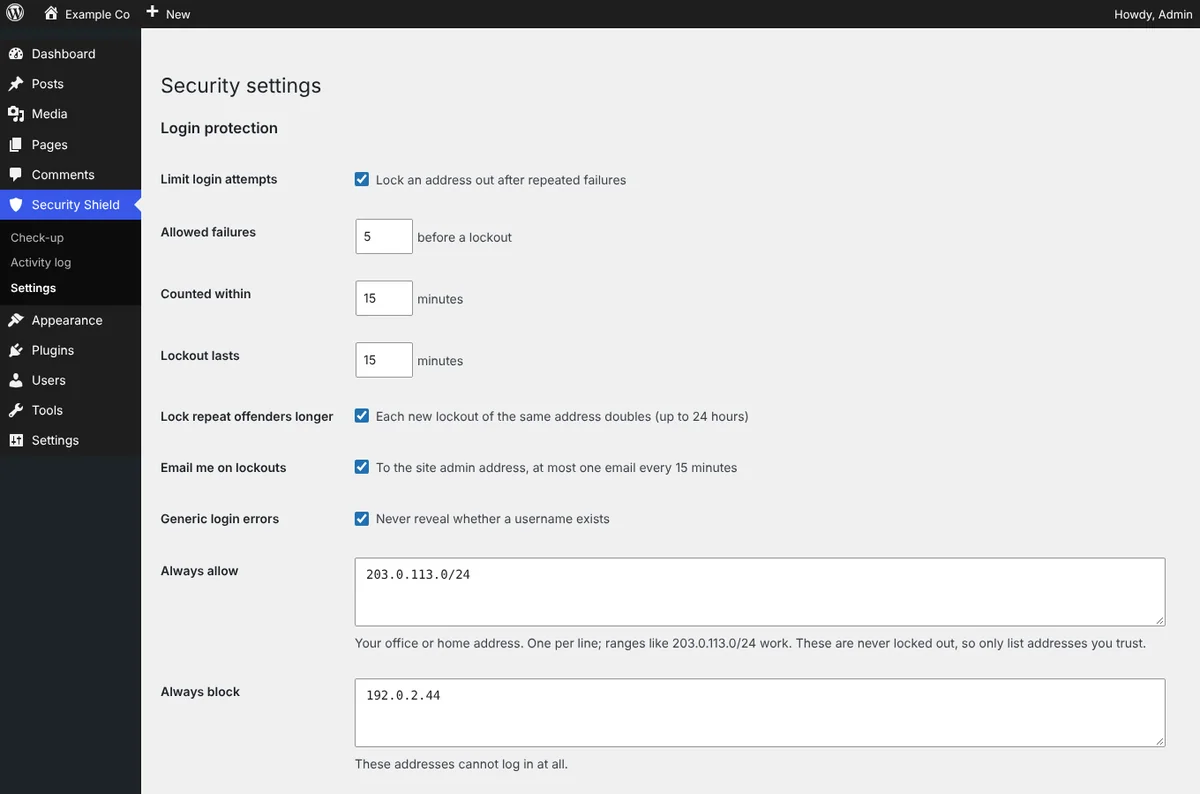
yoursite.com/wp-admin · Settings
Tune the login rules
Step 4 · HardenTune the login rulesAttempts allowed, time window, lockout length and escalation, always-allow and always-block lists, and email alerts.
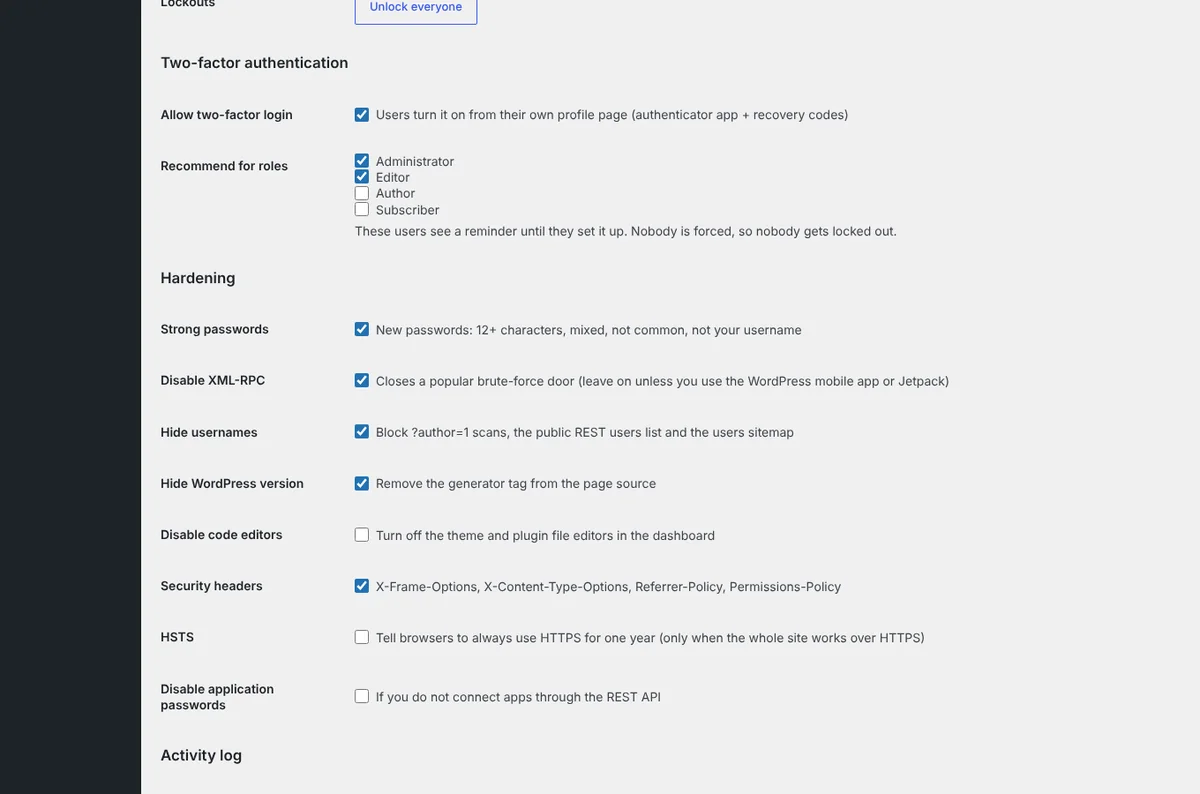
yoursite.com/wp-admin · Settings
Harden with switches
Step 5 · HardenHarden with switchesTwo-factor options and hardening in plain language: password policy, XML-RPC, username protection, code editors, security headers and more.
yoursite.com/wp-admin · Check-up
See where you stand
Step 6 · WatchSee where you standA 0–100 score and a prioritised list of what to fix, with the last seven days of logins, failures and lockouts.
yoursite.com/wp-admin · Activity log
Know what happened
Step 7 · WatchKnow what happenedEvery login, failed attempt, lockout, role change and plugin change, filterable by event, user or address.

Install in 3 steps

  1. Download the ZIP above.
  2. In WordPress go to Plugins → Add New → Upload Plugin, choose the ZIP, install and activate.
  3. Open Security Shield → Check-up and follow the advice, then open your Profile to set up two-factor login.

Download ZIP

Changelog

Version 1.0.0

  • Initial release: login limiting, allow/block lists, two-factor login with recovery codes, password policy, hardening switches, security check-up and activity log.

Need this set up properly, or want something built for your site? Book a free call and we'll help.

FAQ

Common questions.

Is Weberslink Security Shield free?

Yes. It is a free download under the GPL and works on as many of your own WordPress sites as you like.

Which authenticator apps work?

Any app that supports time-based one-time passwords (TOTP, RFC 6238): Google Authenticator, Authy, 1Password, Microsoft Authenticator, Bitwarden and others.

What if I lose my phone?

Use one of your eight recovery codes. If you have none left, another administrator can reset your two-factor login from your user page, and as a last resort you can rename the plugin folder over FTP.

Can it lock me out?

Lockouts are temporary, you can add your own address to the always-allow list, and two-factor login is never forced on anyone. Application passwords and the WordPress mobile app keep working.

My site is behind Cloudflare. Does the limiter still work?

Yes. Choose the CF-Connecting-IP header under Visitor address from, so the plugin sees the real visitor instead of the proxy.

Which WordPress and PHP versions does it need?

WordPress 5.9 or newer and PHP 7.4 or newer.

Next step

Ready to see what we'd build for you?

Book a free 20-minute walkthrough. We'll look at where your business loses time or leads, and what we'd build — no obligation.